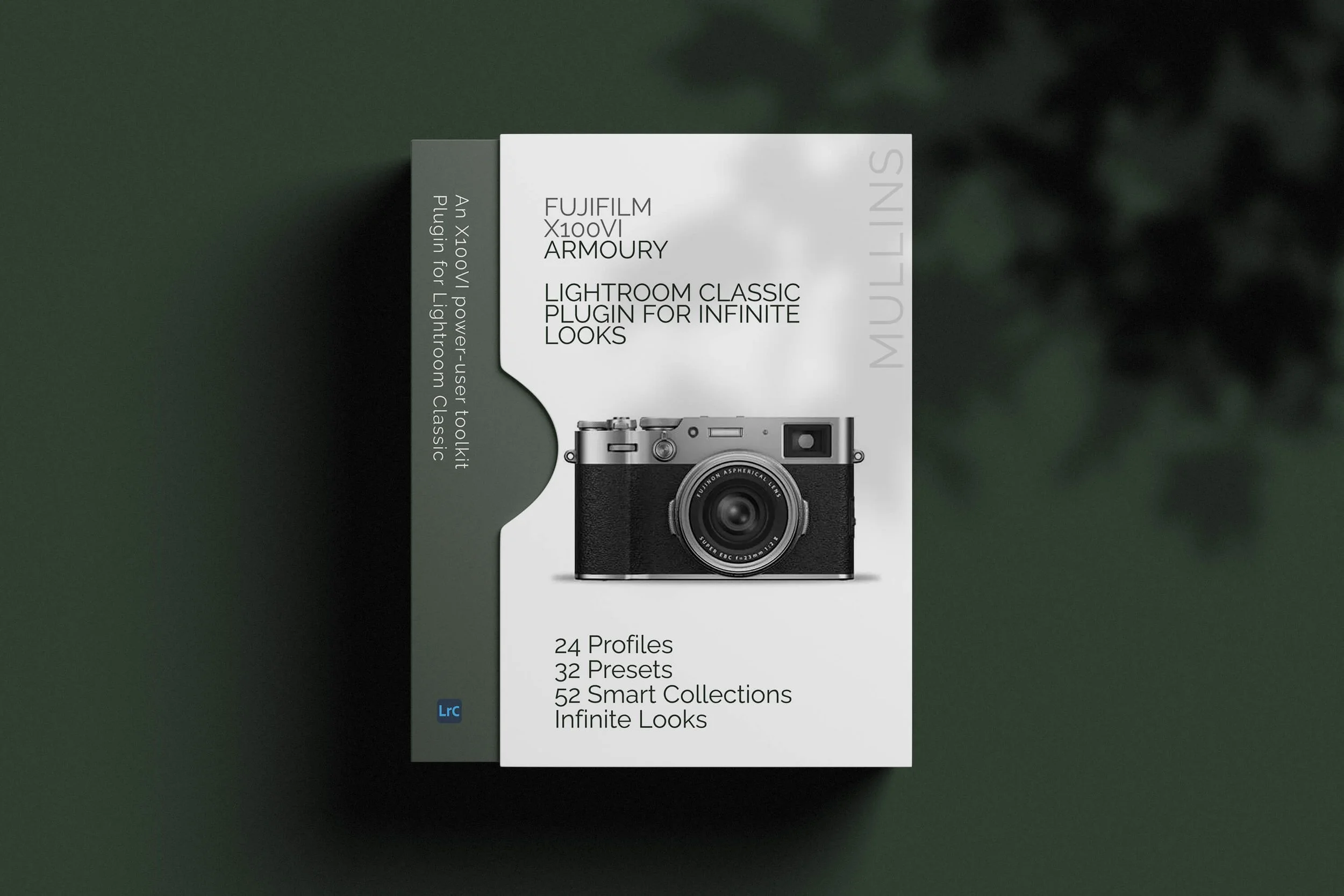
I’ve been working on something new for Fujifilm X100VI users, and it’s now ready.
It’s called Mullins X100VI Armoury, and it’s a Lightroom Classic plugin built specifically for photographers who shoot RAW files with the Fujifilm X100VI.
This is not just a preset pack, although presets are included.
It’s more of a focused editing and workflow toolkit. The idea is simple enough: take an X100VI RAF file, choose a sensible creative starting point, steer the look, generate a result, then keep refining or generating new controlled variations until the image starts to feel right.
With normal presets, you click once and get a fixed result. That can be useful, of course. I use and sell presets myself, and I make a lot of them.
But Armoury goes further than that.
The Quick Build engine lets you create new variations from my custom X100VI profiles and adapted Camera Matching build bases.
Press Generate Now once, and you get a look. Press it again, and you get another variation of that idea.
So rather than giving you a handful of fixed looks and leaving it at that, Armoury gives you a way to explore millions of possible yet controlled editing directions.
I’ve put together a short overview video below that shows how it works in Lightroom Classic. After that, I’ll quickly run through what’s included and who I think this tool is really for.
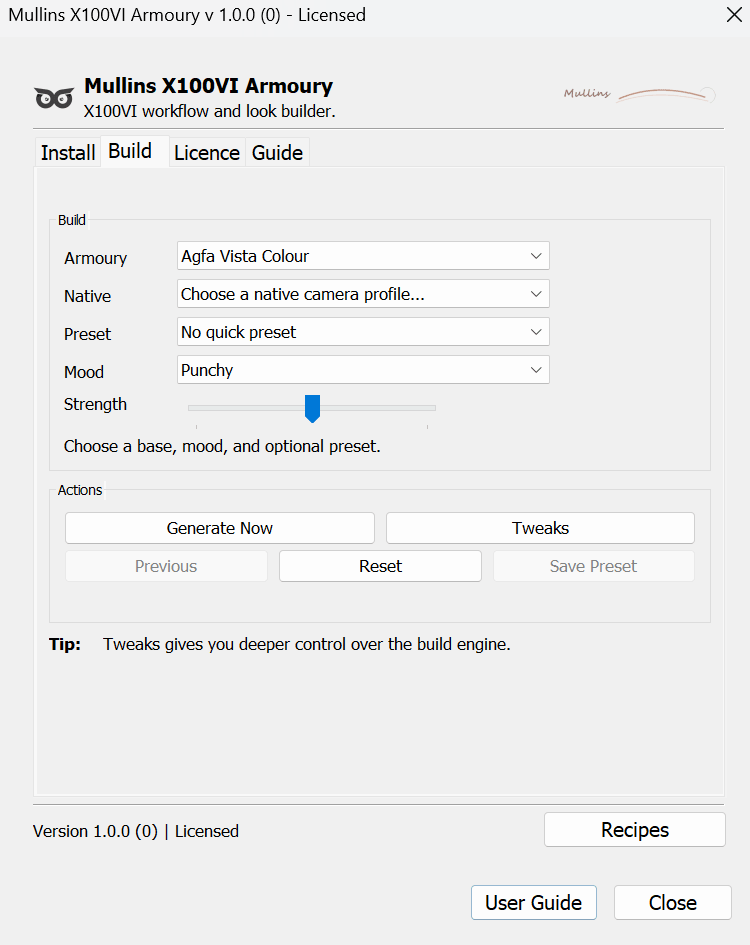
Mullins X100VI Armoury Lightroom Classic plugin showing the Quick Build controls for creating Fujifilm X100VI RAW looks.
What is Mullins X100VI Armoury?
Mullins X100VI Armoury is a Lightroom Classic plugin built around the Fujifilm X100VI.
More specifically, it is built around X100VI RAF RAW files. That distinction is important because this is not designed as a generic preset pack for every camera.
It is focused on one camera, one RAW workflow, and one particular kind of photographer: someone who loves the X100VI, but still wants the flexibility and quality of editing properly in Lightroom Classic.
Inside the plugin, you can build looks from 24 custom Armoury profiles made specifically for X100VI files, or from 20 adapted Camera Matching build bases inspired by Fujifilm’s own film simulations.
You also get 25 one-click presets, split between colour and monochrome, for those times when you just want something finished quickly.
But the bigger part, for me, is the Quick Build engine.
Rather than clicking through a preset list and hoping one lands, you can choose a starting point, set the mood and strength, then generate a look. If it’s close but not quite right, you can generate another version, use the tweak controls, step back, or save the result as your own Lightroom preset.
It’s a bit like having a guided creative assistant inside Lightroom. One that gives you useful directions to explore.
I’ve also included Smart Collections, AI utility presets, and a Recipe Roulette feature for creating Fujifilm JPEG recipe ideas. So it’s not just about colour and tone. It’s about giving X100VI users a more complete, more enjoyable Lightroom workflow.
What’s included in Mullins X100VI Armoury?
24 custom Armoury profiles: X100VI-only profiles designed as creative foundations for building colour and monochrome looks in Lightroom Classic.
25 one-click presets: 14 colour presets and 11 monochrome presets, all built for quick finished results when you want speed rather than experimentation.
20 adapted Camera Matching build bases: familiar Fujifilm-style starting points, including Acros, Classic Chrome, Classic Neg, Velvia, Eterna and others.
Quick Build engine: choose a base, set the mood and strength, press Generate Now, and create controlled variations from your selected X100VI RAW file.
6 AI utility presets: quick finishing tools for local adjustments such as background darkening, face brightening and subject pop.
52 Smart Collections: a practical Lightroom workflow structure for dates, ISO, edit state, file type, aspect ratio, treatment and publishing purpose.
Recipe Roulette: Fujifilm X100VI JPEG recipe ideas you can test in-camera or in X RAW Studio, without changing your selected Lightroom photo.
The bigger idea: Armoury is not just a preset pack. It gives you a creative system for exploring X100VI RAW files, building new looks, saving favourites, and getting to a finished direction without starting from scratch every time.
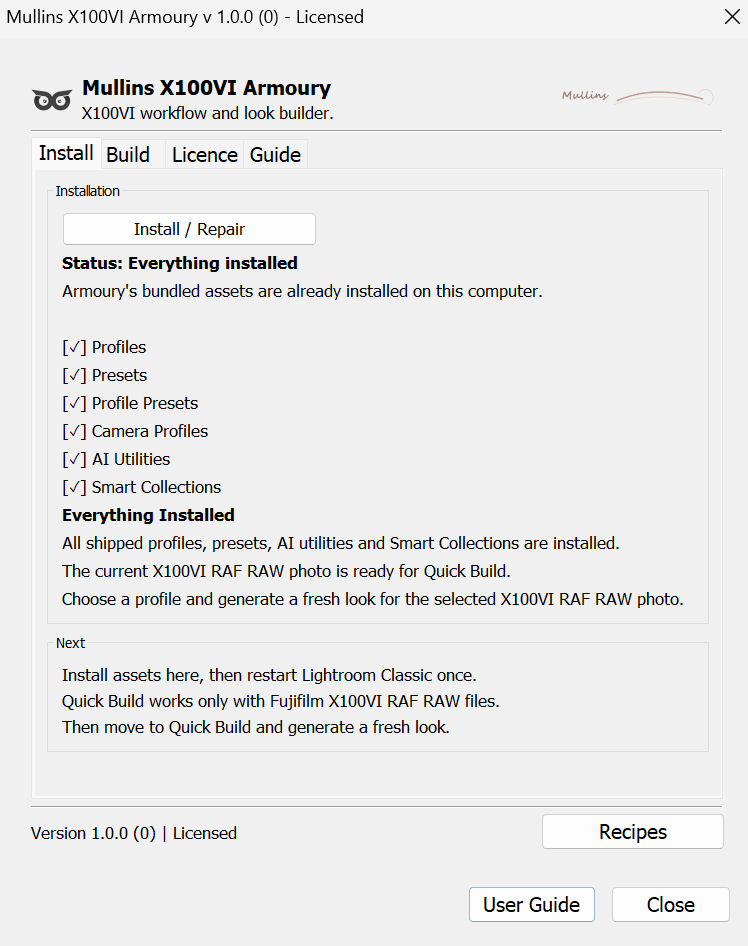
Mullins X100VI Armoury install page showing the built-in installer for profiles, presets, AI utilities and Smart Collections.
Why I built it specifically for the X100VI
The X100VI is one of those cameras that people genuinely enjoy using. It is small, beautifully designed, and very capable, but it still feels like a camera rather than a computer with a lens attached to it.
A big part of that appeal is the Fujifilm look. The film simulations, the JPEG recipes, the way you can walk out with a camera and come home with files that already have character. I love that side of it.
But I also know that many X100VI users shoot RAW as well.
Sometimes you want the flexibility of the RAF file. The light might be difficult. The colour might need a bit more care. Or perhaps you simply want more control over the final image in Lightroom Classic.
That is where Armoury came from.
I wanted to build something that respected both sides of the camera: the enjoyable Fujifilm recipe side, and the more considered RAW editing side.
The one-click presets are there when you want a quick finished look, but the plugin also gives you a deeper way to explore variations when you want to go further.
And that is the key difference, really.
Presets are brilliant when you want speed, consistency and a known result. Armoury keeps that, but adds another layer on top. With Quick Build, you can start from one of the custom X100VI profiles or adapted Camera Matching bases, generate a look, generate another variation, tweak it, save it, and gradually build up results that feel more personal to your own work.
It is built for one camera and one job: helping X100VI RAW shooters create better finished looks in Lightroom Classic with less friction.
I’ll be working on versions for other cameras in the future.
Presets and Quick Build: what’s the difference?
The one-click presets are fixed finished looks: Armoury includes 14 colour presets and 11 monochrome presets, all built from the custom X100VI Armoury profiles. They are there for the times when you want to click once and get a strong result quickly.
Quick Build is more exploratory: instead of choosing a finished preset, you choose a creative starting point. That might be one of the 24 custom Armoury profiles, or one of the 20 adapted Camera Matching build bases.
Generate Now creates controlled variations: choose the mood and strength, press Generate Now, and Armoury builds a look on the selected X100VI RAW file. Press it again and you get another variation of the same broad direction.
It is not random chaos: the idea is to explore within a guided framework. You are still steering the look, but Armoury gives you fresh directions to try without starting from scratch every time.
Save the ones you love: once you land on a look that works, you can fine-tune it and save it as your own Lightroom preset for future use.
In simple terms: the presets give you speed. Quick Build gives you variation, control and discovery.
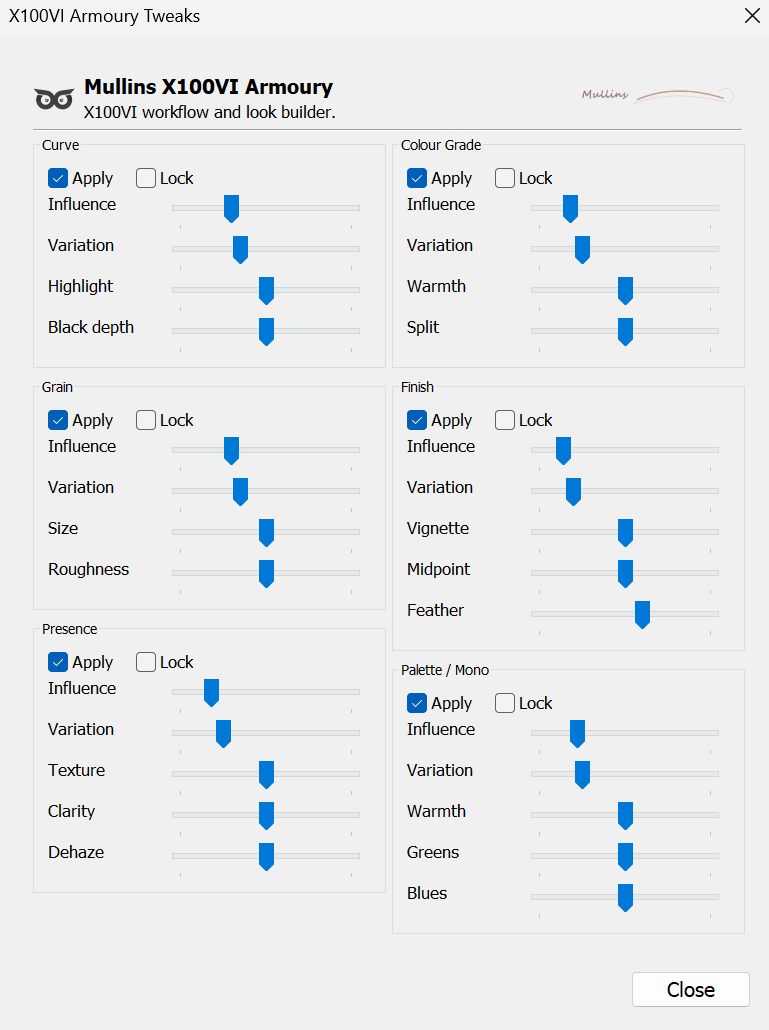
Mullins X100VI Armoury tweaks panel showing controls for curve, grain, presence, colour grade, finish and palette options.
Who is it for?
Mullins X100VI Armoury is mainly for photographers who shoot RAW files with the Fujifilm X100VI and edit those files in Lightroom Classic.
It is probably a good fit if you like the look and feel of Fujifilm images, but still want the flexibility of working with RAF files. Perhaps you use JPEG recipes sometimes, but still want more control over colour, tone, contrast and finish when editing properly.
It is also for people who enjoy experimenting.
You might use the one-click presets most of the time. You might prefer building your own looks with Quick Build. Or, like me, you might use a bit of both depending on the image and your mood that day.
What it is not, though, is a generic preset pack for lots of different cameras.
Quick Build is designed specifically for Fujifilm X100VI RAF files in Lightroom Classic, and that focus is very deliberate.
By keeping it specific, I’ve been able to make it feel tighter, cleaner and more useful for the people it is actually made for.
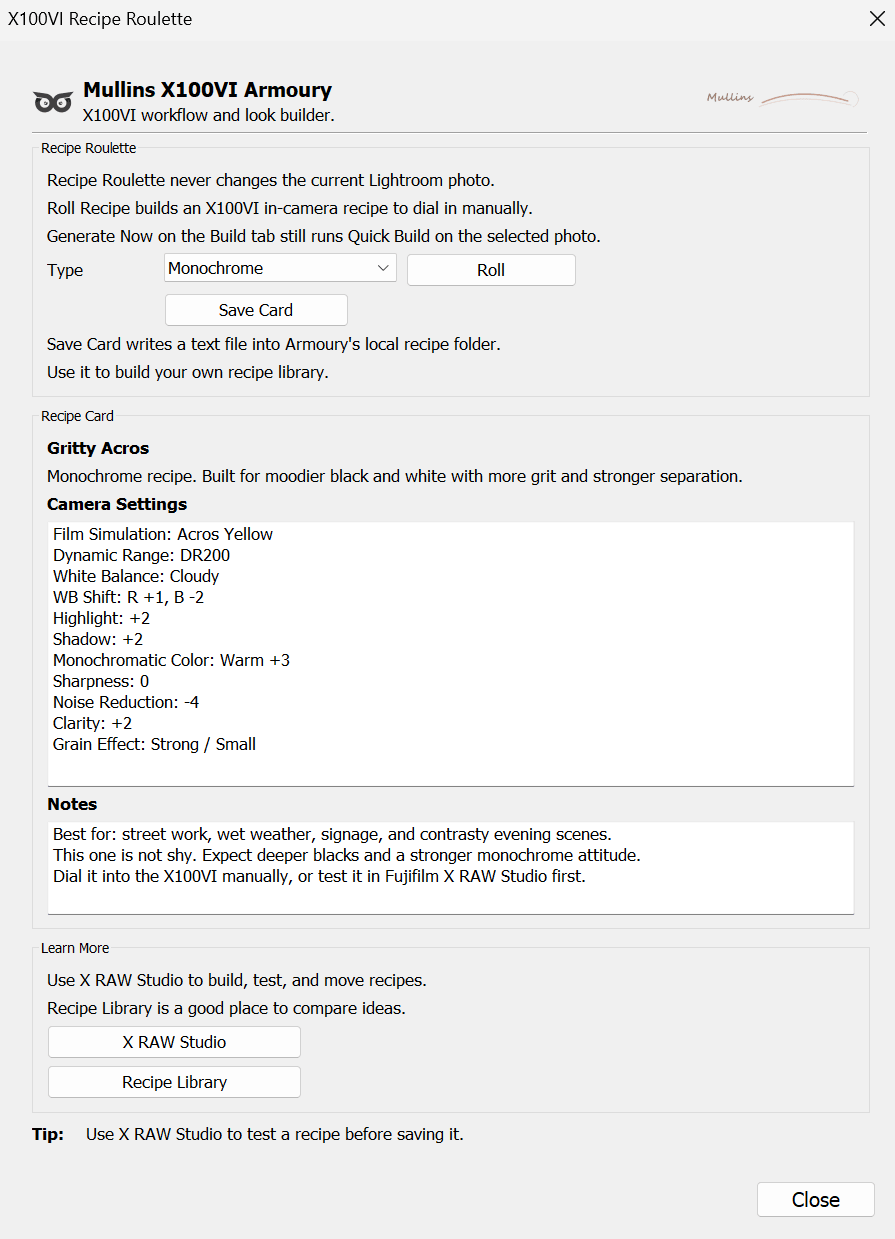
Mullins X100VI Armoury Recipe Roulette tool showing generated Fujifilm X100VI JPEG recipe settings.
You can see more about the X100VI Armoury Lightroom Classic Plugin over on the User Guide Page.
View Mullins X100VI Armoury
Mullins X100VI Armoury is available now for Lightroom Classic users who shoot Fujifilm X100VI RAF files.
It includes 24 custom Armoury profiles, 25 one-click presets, 20 adapted Camera Matching build bases, Quick Build, Recipe Roulette, AI utility presets and 52 Smart Collections.
The video above gives you a quick look at how it works, but the full product page goes into more detail and shows more examples from the included profiles and presets.